How To Enable Snapchat Filters On Iphone
Click on the profile icon at the top right of the application click on Manage Accounts and go to Devices. Open a meeting on Zoom.

How To Use Filters Emoji Sketches And Lenses In Snapchat Imore
Enable the camera option on the page.

How to enable snapchat filters on iphone. Filters are static while lenses discussed below are animated. Also check if you have a healthy internet connection as Snapchat filters are available only when your mobile has viable Wi-Fi or cellular data. Next you should head to your profile.
Now the company has a new trick up its sleeve that adds depth to your selfies and even more new filters and that feature is called 3D Camera Mode available for iPhone models with the TrueDepth camera used for Face ID. Ensure that Filters is enabled with a checkmark. Click on the Video Camera icon and choose the Snap Camera.
Geofilters let you add specific location-based filters to your photosFor example if you snap a picture in Manhattan youll see different geofilters compared to if you were in Brooklyn. Allow access through Snapchat settings Scroll down to Snapchat app or simply search in the settings option for the app. Position the Snap Camera app so its next to the Zoom app and easier to handle.
Learn How to Enable Camera on Snapchat on iPhone on IOS. Tap the slider at the top to turn on filters. Apply it and send your Snap.
Open Snapchat and then swipe down on the camera screen to access your profile. Augmented reality experiences friends can play with. As you know Snapchat will now automatically lead you to the camera.
Click a different filter in Snap Camera and your face in Zoom will change to take on that appearance. Promote your website app or products with ads on Snapchat. How To Give Snapchat Camera Access.
Click on the option of the app. Hold on things are about to get interesting-. These filters require you have activated geolocation.
How to apply two snapchat filters at once snapchat. Scroll down to Additional Services and enable Filters Once this is enabled you will be able to access and use Geo-filters. You can also enable it from your phones settings by going to Permissions and checking the Location box.
The chat apps array of effects rivals even the fiercest competition from filter masters like Instagram. How to use Snapchat filters without creating an account. Tap Manage Preferences to open up your Snap options.
Create a free filter for a location or moment that is special to you. When it comes to filters Snapchat is no slouch. Available for macOS and Windows 10 Snap Camera brings all of the filters and effects from Snapchat to desktop OSes so you can appear with.
Inside settings scroll down through the menu until you reach the Additional Services category. After installing this app connect your iphone and then launch 3utools. Click on the option of the app.
Frames and artwork friends can add to their Snaps. If you want your Snaps to be unique just add one or more filters. To apply them go back to the camera screen and swipe until you find a message that asks you to enable your geolocation.
Tap on the Settings icon at the top-right corner of the profile screen. Once done this you are now able to add filters and lenses and change background during your Zoom meeting. Please note that you will need to enable location services.
Up to 75 cash back Snapchat has been testing its geofilters feature for some time now but now everyone can use the feature if youre physically in the right place. From there launch the Microsoft Teams app and create a profile. Tap on Manage Preferences Step 4.
Heres how to activate and use your filters. Open the Snapchat app. Fenty makeup sticker by gabbyrani in 2021 makeup.
Select Snap Camera. Enable the camera option on the page. Enable Snapchat filters.
Is pretty simple you just need an iphone that is jailbrokenHow to add. Hi guys today i am going to show you how to enable all snapchat filters in any iphone. How to use Snapchat filters.
Tap your profile icon located in the top-left corner of the screen. Open Snapchat and log in if needed. You will see various options from microphone to notifications on the list.
If you do not see the option it means your filters are enabled by default and cannot be disabled. In this video you will be to able to allow snapchat to use your camera and enable it on ios devices. Some of the available options include the temperature the time your current location and more.
As soon as this software has detected your device click on. You will see various options from microphone to notifications on the list. Allow access through Snapchat settings Scroll down to Snapchat app or simply search in the settings option for the app.
If you are not logged in make sure to log in so you can proceed further. Now you need to enable the option Filters which will activate the options filters and Geofilters. If youre using Snapchat on your Android or iPhone device heres how to do it.
Choose the teleport mode icon the third one from the. Make a Snap and swipe left or right until you find a filter you like. If you are unable to use Snapchat filters then make sure to enable them in the Settings Manage and turning the filters slider on.
Scroll down briefly to the Camera section and select Snap Camera. In this way you can enjoy the Snapchat Geofilters on iOS and it does not require you to change any additional settings. The procedure of enabling the filters on Snapchat starts by opening your app.
How To Get Custom Snapchat Filters Lenses Ios And Android Youtube
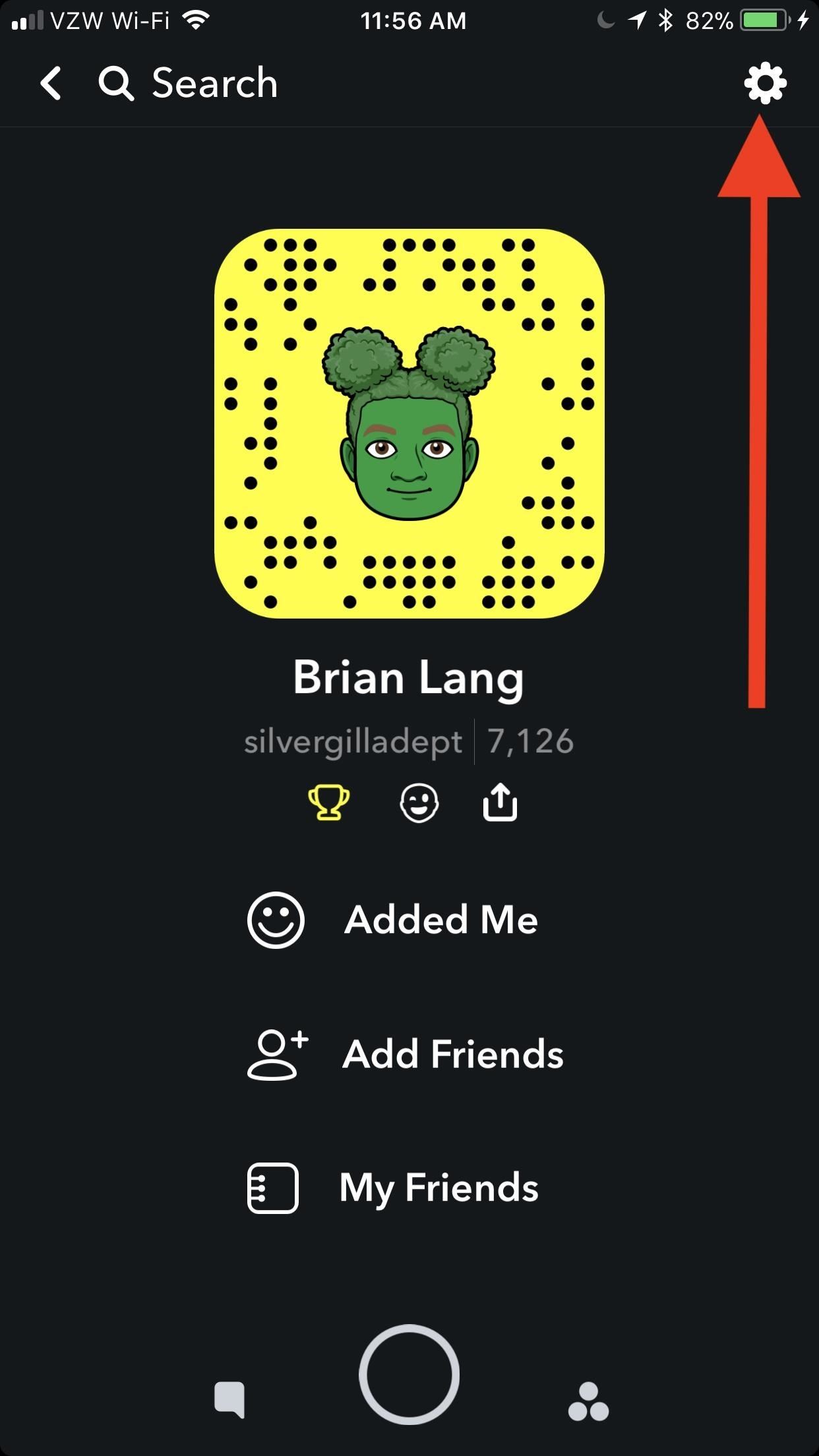
Snapchat 101 How To Make Your Own Custom Geofilters Lenses Smartphones Gadget Hacks


Komentar
Posting Komentar