How Do You Add Snapchat Filters To Zoom
How to Use Snapchat Filters on Zoom Set Up Snap Camera. Learn how to add snapchat filterseffects to zoom meetingsZoom is one of the leading online conferencing and meeting application.

How To Use Snapchat Filters On Zoom Meetings Youtube
Change your Zoom camera settings.
How do you add snapchat filters to zoom. You may need to scroll up until you see this option. Select the video option. Frames and artwork friends can add to their Snaps.
Scroll through the menu and find the lens youd like to use. How to get Snapchat filters on Zoom 1. Promote your website app or products with ads on Snapchat.
Click the star icon on a lens to save it. Heres how to do it. The background will go away entirely with one click and if you add a second click it will add a green screen.
Thank you Snapchat for. Youll need to agree to the privacy policy and enter your email address to. Now that youve learned how to add Snapchat.
Create a free filter for a location or moment that is special to you. Click on the Video Camera icon and choose the Snap Camera. I Wanna Add A Snap Filter On Zoom Here Is How You Do It Video In 2021 Life Hacks For School.
Snap Camera essentially functions as another camera input for your video conferencing software so youll need to switch over to it in order for your chosen filter to appear in the meeting. Choose Snap Camera in the video settings of the Zoom preferences. Once done this you are now able to add filters and lenses and change background during your Zoom meeting.
Open a meeting on Zoom. You should now see your selected filter in your video preview. On Zoom do this by clicking the arrow next to the Start Video button and selecting Snap Camera instead of the default camera.
Complete the installation process and accept the apps camera and microphone permissions. Now click Start Video to turn your video on and you should see your face with your. Click on the gear icon in the upper right corner.
With Snapchats new desktop camera app you can now use Snapchats fun filters on Zoom calls. The process is straightforward and you will need the Snapchat desktop app Snap Camera for this purpose. Augmented reality experiences friends can play with.
If youre looking to add a little spice to your seemingly endless stream of Zoom meetings or you just like to stand out from the crowd you can add Snapchat filters backgrounds and lenses to. Now that youve seen me put the filters to the test go forth and jazz up your next Zoom call with the fun filters your coworkers and happy hour pals never saw coming. Remove zoom filters in a meeting.
Open your Snapchat app and open Snapchat Camera. Open the Background Filters tab on the zoom settings then choose the Video Filters sub tab. How To Use Snapchat Filters On Zoom For Some Much Needed Laughs Zoom Call Snapchat Filters Video Conferencing.
To change your Snapchat filter in Zoom keep Snap Camera open and shuffle through the collection of lenses available on the app. It has stunning features a. If you dont already have it download and install the Zoom Client for Meetings software.
Here you will be able to select from a range of predefined filters. You change the filters simply by going to the Snap camera application and adjusting it there. The Video screen shows a.
To use AR lenses from Snap Camera onto the video calling app start a meeting in Zoom and select the Snap Cam as the video source and then open up Snap Cam on your desktop. Select the box labeled None in the upper left corner of the filter selections. Download Snap Camera to your PC or Mac.
Click it to open the Settings menu and then click on Video on the left side of the Settings window. In a Zoom meeting click the up arrow next to the Stop Video icon and select Choose Video Filter to open the Settings window. Click the star icon which appears when you hover over a particular filter or lens to add it to your favorites and make it easier to access.
Now your Zoom app will use Snap camera output. If you want to see hundreds of more filters and stand out from your other meeting participants we advise you check out the Option 2 for setting up custom filters lower in the post. Tap on the Lens Explorer icon thats on the bottom right part of the screen.
Watch this video to learn how to use Snap filters on Zoom meeti. Download Snap Camera from the official website and give a desktop app access to your microphone and camera. Look for the gear icon in the upper-righthand corner of your Zoom app.
Add Snapchat Filters to Zoom. Pin On Virtual. Select Snap Camera.
Snapchat Filters For Meet Zoom Teams Hangouts And Skype Having Fun D Snapchat Online Online Classes Snapchat Filters. Steps to use Snap Cameras cartoon filter on Zoom for the next meeting. Your webcam is using the feed from Snap Camera for your video call so whatever filter you see in Snap Camera is also being seen by the other members in your Zoom meeting.
Open the Zoom app. Tap in the middle of your screen to open the Lens menu. First things first click on the video window that shows your Snap Camera lens.
With that you should be able to layer a Snap filter on top of your custom Zoom background. Click on the menu button in the top right corner of the video call select video camera and choose the Snap camera from the options there. Hold on things are about to get interesting-.
Once thats done you can add any filter or lens to your Zoom camera.
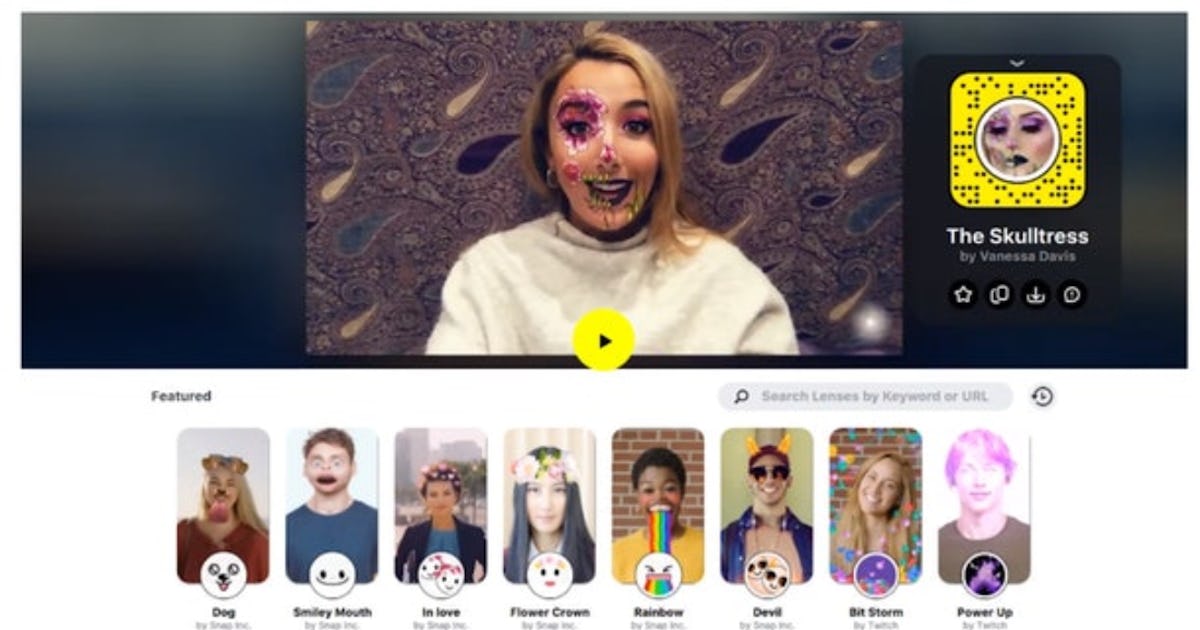
Here S How To Get Snapchat Lenses On Zoom To Liven Up Your Chats

How To Use Snapchat Filters On Zoom


Komentar
Posting Komentar