Why Is My Front Camera Flash On Snapchat Not Working
Link to this Post. Some drivers dont provide this option.

Snapchat Front Facing Camera Flash Not Working After Update Company Investigating Fix For Dark Flash Problem Player One
Start out by uninstalling any third party camera applications that you have downloaded to the phone.

Why is my front camera flash on snapchat not working. If your driver doesnt have Roll Back Driver available go ahead to the next fix. You can do this by pressing the volume up button then pressing the volume down button then holding the side button until the Apple logo appears. Use precise geolocation data.
This will be at the top of the screen with the camera icon. There are some users complaining about the Zoom camera not working on their Android phone. Front camera flex might be tore.
Its possible that both the methods are required to fix the issue. Jan 29 2017 129 AM. Galaxy S10 camera not working fix 1.
If the flashlight is not on remove the iPhone case or bumper if there is any. So in case the issue is not fixed by one of the methods to do this try both. In the Storage you will see two buttons.
Tap the large circular camera button towards the bottom of the screen to capture a selfie even if its dark. Select the Driver tab select Roll Back Driver and then choose Yes. The next method that you can try is to wipe the cache partition.
Must be the issues of hardware. HttpsgooglbG2KBz GEAR I USE. Your Galaxy S10 is not a finished product at least not from a software standpoint.
Snapchat Filters Not Working Heres What to Do. Lets Clear The Air. Zoom Camera Not Working On Android.
Tap flashlight and see if the light is on. HttpsgooglXDvaQrSUB TO MY SECOND CHANNEL. Next scroll to the Additional services section and tap on Manage.
In Device Manager right-click or press and hold on your camera then select Properties. Go to Settings app and choose General. As the error message Cant Find or Start Your Camera 0xA00F4244 or 0x200F4244 suggests Windows 10 camera cant be found or started probably because it is blocked by antivirus service or the webcam driver is outdated.
When ever I click on the screen to find my face it doesnt work I. Flash is on when the lightning bolt does not have an x beside it. When your iPhone 7 camera is not working youre sometimes dealing with a software problem such as an app.
Use method1 first and then follow it up with method 2. User profile for user. You can simply upgrade it to solve it.
My rear camera lens stoped working a few days ago and I tried re downloading the app and even updating and restarting my device but nothing seems to work. Swipe up to bring out Control Center. Here are a few things you can try to fix the Windows camera that is not working.
Swipe down your phones screen and set manually the brightness at maximum. The phone might have received an update for its software and the developer of the app might not have had the chance to update their app yet. Hi Try going to Settings Photos and Camera Photo Filter and turn that off.
Open the Snapchat app click on your profile picture and tap on the Settings menu represented by the gear icon. Click the System Preferences icon on your Mac head over to Security privacy Privacy Camera and check the box adjacent to Snap Camera. Check the Front-Facing Flash option to enable the feature.
See the cable is not connected properly onboard. Use the Restart Camera APKby temasek this just restarts the camera but is quicker than. First many people will tell you that you definitely have a hardware problem this is 100 false.
Clear the cache and data of the camera. When in reality all you ahve to do is delete a lot of photos and videos combined i had over a thousand and i deleted around 500 photos and videos all together then powered off the phone turned it back on opened snapchat and boom my camera finally worked. Press the Windows Key I shortcut head over to Privacy Camera switch ON the toggles adjacent to Allow apps to access your Camera and Snap Camera.
Doing this will actually reset the camera app and all its services. Resetting the camera app can fix system glitches that may make the camera not working on Windows 10 and give the app a fresh restart. Windows users should go into the Device Manager and check to make sure the cameras drivers are up-to-date.
Jan 29 2017 129 AM in response to Aschwenkel In response to Aschwenkel. For users with camera flash not working problem the following steps may be able to help you. Reply Helpful 2 Thread reply - more options.
If the iPhone front camera not working or the back camera you might be having an outdated iOS. Before we dive into the troubleshooting guide I want to acknowledge the fact that there is a lot of misinformation when it comes to iPhone 7 cameras that wont work. Fix Zoom Audio Not Working on Android.
You can try resetting your iPhone 8 or iPhone 8 Plus. Update Snapchat if there is an update available Restore your phone to factory settings you have to be pretty desperate to do this one Flash the Omni Rom Mod. This will remove any lingering settings and unused bits of code that Snapchat is holding on to.
Tap the lightning bolt icon. Once you notice theres an issue about the android phone camera not working f or instance you launch the app and the error message camera not working pops up almost immediately dont hesitate to restart the device especially if youve used your device for a long period. One of the common reasons in Why is my camera not working on my laptop is your camera permission is limited by yourself.
Fixing The Apple iPhone 8 And iPhone 8 Plus Camera Not Working. One of the buttons reads Clear Cache and the other says Clear Data. Tap the Clear Cache button first then wait a few seconds and tap Clear Data.
One is clearing the lens cache and the other one is to install a system update. Face id is also not working if the front camera is not working anymore and that cant be changed new one only the flex can change. If it is the LED flash is fine.
It works in Zoom v512 but not Skype. If this is just a problem with the app or some of the services then this procedure will. The camera and the Flashlight just would not work i tried every reset and nothing.

9 Snapchat Tips And Tricks You May Not Know About Scion Blog
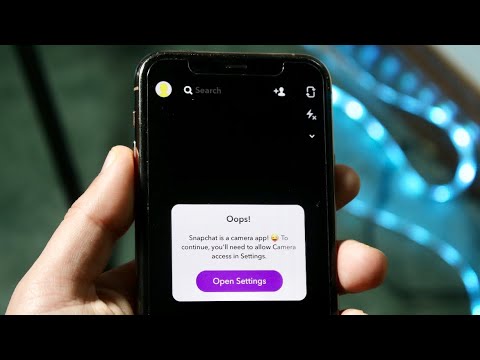
Fix Snapchat Camera Not Working 2020 Youtube


Komentar
Posting Komentar