How To Do Snapchat Filters On Back Camera
Once youre on the camera tap on the smiley face icon. Social media is one of the life-saving platforms including Snapchat in todays century.
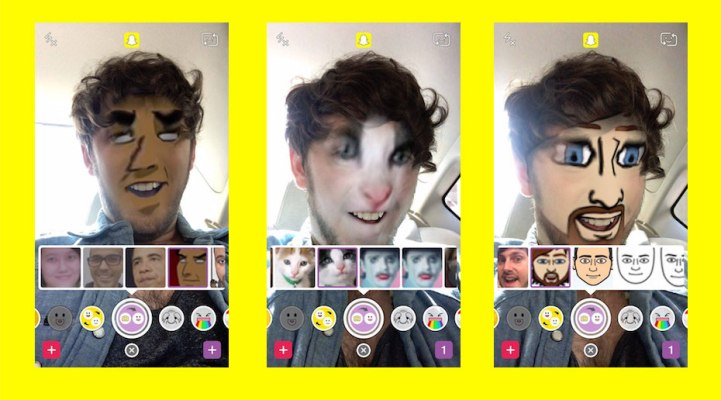
Snapchat Lets You Face Swap With Your Camera Roll Drops Paid Replays Techcrunch
If you have multiple webcams connected to your computer you can select the webcam you want Snap Camera to use.

How to do snapchat filters on back camera. Underneath the camera button press the small vertical box. Then you need to proceed to the Filters heading. You have reached your destination which is our article.
Tap on Camera Roll in the top panel and select your video. Snap Camera does not work on FaceTimeso that might be good news for some folks out there. Once we have selected our Snap Camera filter we check that it is enabled to be used by our camera.
Now tap and hold on the video to bring up a menu. In the space of mere seconds I was able to transform completely without ever lifting my head off the bed. If you are looking to put Snapchat Filters on camera roll pictures then your journey ends here.
Make sure to turn this option on and then get back to the camera to check if the filters are working. Overlay the face filters over someones face and then start snapping. After youve tapped on the smiley face icon a list of filters will appear.
Activate Snap Camera and use it on Microsoft computers. Select the camera in the Choose Your Camera dropdown. On the bottom navigation bar tap on Explore to see user-created filters.
I am Counsellor by profession. Lenses are the small smart filters that can scan a persons face and put images on top of them. To open the Snap Camera settings select the Settings icon in the top right corner of Snap Camera.
Available for macOS and Windows 10 Snap Camera brings all of the filters and effects from Snapchat to desktop OSes so you can appear with. Other Reasons Why You Cannot Use Snapchat Filters. You should now see your selected filter in your video preview.
Currently you can use face filters from both the front-facing camera and also the back facing camera. Madison Malone Kircher. Snapchat Memories is where you can save your Snapchat snaps and access and upload your existing photographs and videos from your smartphone.
Open Snapchat on your phone. In addition you can press the stack icon that appears under the other creative tools to apply multiple layers of filters to your Snap. How to use Snapchat Filters.
I was finding my favourite filters. To begin with open Snapchat and navigate to the camera on the app. Whether its a Filter that frames the moments at a friends wedding or a Lens that makes birthdays even more hilarious your custom creations will.
But it was t. Go to the Snapchat application. Here we will select the Privacy option.
You can now swipe left to reach the reverse motion filter. Using your snapchat camera view the snapcode image above and hold your finger on the screen to activate the snapchat lense on your device. Try Snap Camera For Windows Mac.
Snapchat has updated to allow people to use its lenses with the back camera. Since Snap Camera creates a virtual webcam if you close or quit the Snap Camera app it cannot process the filter onto your webcam. Social media filters from Snapchat and Instagram that change a users facial features work using a technology called Augmented Reality.
You should find and tap on the option Manage which is placed under the section named Additional Services. To access Snapchat filters swipe left or right on your Snap. Swipe up from the camera screen to reach your Memories.
How to use Snap Camera Watch this quick tutorial and learn how to introduce your AR self to the Internet. Snapchat photo filters can be used on anything with a face. A new Lens on gaming Choose Lenses that match your play-style persona or mood.
How Do I Get Into My Snapchat Memories. After you toggle the filters on go back to the main Snapchat window and check whether you can use them. The following are the steps to go to Snapchat Memories.
The available filters include color effects holiday graphics timestamps or Geofilters based on your location. Answer 1 of 2. Create your own Snapchat Filters and Lenses.
I turned myself into a dog a vampire and a beauty queen with a full face of makeup today. Now launch the Snapchat app. If you are visiting this page your mobile device with Snapchat installed you can click the direct link above and it will automatically activate the lense.
Now in the block on the right we must look for the option Camera and click on it. How to disabled Snap Cameras filters and lenses Quit and close Snap Cameras app. Just tap the screen and the icon by the button will show.
Choose Snap Camera in the video settings of the Zoom preferences. You should know that only a handful of Snapchat filters are permanent. I am creating this video to help all Snapchat users to find old filters back.
For this we must access the Configuration menu for which we will press the keyboard shortcut Windows I. Snap Camera essentially a desktop version of the Snapchat app allows you to use your computers built in camera to chat livestream and of course try on every hilariously ridiculous filter. Snapchat just unveiled the Lens Store a place where old photo lenses like rainbow puke are still.

How To Add Snapchat Filters To Existing Photo Youtube

Snapchat Tutorial How To Get Old Snapchat Filters Back Youtube


Komentar
Posting Komentar