How To Find Snapchat Filter Name From Memories
Scroll above to know the most popular of them. Take A Snapchat Filter Off A Photo.

Mehndi Sangeet Snapchat Filter Indian Wedding Snapchat Etsy Wedding Snapchat Wedding Snapchat Filter Snapchat Geofilters Wedding
How to Use Snapchat Filters.

How to find snapchat filter name from memories. Filters that you apply after a snap is taken are the first part of this tip. The Knot Snapchat Filter Promo Code. You can tap on birthday occasions Valentines day and similar or you can simply start from scratch.
Click a picture by pressing the icon appearing on the middle bottom of the screen. Design and submit to Snapchat instantly. Snapchat also has a smart search filter which allows you to search for keywords like sunset or food to find particular Snaps.
Save your snap in the Memories by clicking on the Save button. Filters are used after you take a picture or record a video and can then overlay a design on top. The second kind of filters are the really fun filters.
How to use Snapchat Filters. They can then take pictures using. The Ace Family Snapchat Filter.
When you click on My Data it requires you to login in using your Snapchat ID. Op 2y Snap Lens Network Member. There are two different kind of filters in Snapchat.
Whether its a Filter that frames the moments at a friends wedding or a Lens that makes birthdays even more hilarious your custom creations will. Design and submit to Snapchat instantly. Filters can change based on special events or holidays location or time of day.
Lenses Lenses are where AR comes into play. When you tap the search bar youll see your Memories organized by categories and locations allowing you to narrow down what youre looking for. Lifes more fun when you live in the moment.
Another way to get her is to swipe up. Jamie Laing uses Pixar filter on girlfriend in hilarious clip. Open your Snapchat app.
Social media has played an important in the past decade in our daily lives. They had a blue flame one a bit ago but when I search it it wont show up. Users can then select the first filter to come up.
Open Snapchat App. How to Use the Filters in Snapchat. Swirly Face Snapchat Filter Name.
Send your snap to your friends by clicking on. Ad The 1 Geofilter Maker for Snapchat. Its the two overlapping photos at the bottom-center part of the screen.
Snapchat lets you easily talk with friends view Live Stories from around the world and explore news in Discover. To access Snapchat filters swipe left or right on your Snap. I believe the blue flame one is called fire body.
Go to your profile. Thomas The Train Snapchat Filter. If you dont know the name you can always search parts of names it might be like fire and scroll through the lenses.
Then hold down the screen so that the filters come up and click explore In the explore search bar users can search for the face tattoo filter. Swipe left or right to choose a filter you like. Once you have logged in users need to go onto the camera.
Filter A Snapchat filter is a fun way to jazz up your Snaps by adding an overlay or other special effects. Go to the Settings icon. Memories or Snapstreaks from one username to another.
Open Snapchat on your phone or tablet. These filters go over your photo or video. Yes all the Snapchat filters have names.
Create your own Snapchat Filters and Lenses. Fire up the camera and you will see lots of filters. Look for the yellow icon with a white ghost on your home screen or in the app drawer.
Tap the Memories icon. How to find the name of a Snapchat made Lens and use it. You can even create standard filters for users to add to their snaps.
The available filters include color effects holiday graphics timestamps or Geofilters based on your location. You can now swipe left to reach the reverse motion filter Snapchat Display Names can be easily changed Credit. Tap on On-Demand Geofilters.
Socially we are much more active these days and today we have various social media platforms to express ourselves to a wide amount of audience. Standard filters can be made available only to people within a certain geographical location so you can be sure to target the right customers. Scroll down a little until you find the My Data option in the Privacy section.
What are the most popular Snapchat filter names of all time. How to Recover Deleted Snapchat Pictures and Memories on Android. Then go to Settings.
Finish your snap and tap the white arrow to send it to your friends story and memories. How to use Snapchat filters. To activate your filters you need to take a photo or a video and swipe right or left over it to cycle through them.
Snapchat Lenses allow you to add 3D special effects objects and characters to your photos or videos. Thomas The Tank Engine Snapchat Filter. But while filters are static and lenses are animated users tend to use them interchangeably.
One of the newer features on Snapchat allows you to post straight from your camera roll or share previous snaps. Once youve done the last step Snapchat will ask you about your occasion. The best Geofilter Maker for Snapchat.
From here select the memories option to recover them. All that users have to do to find the filter is follow these simple steps. My Data page will open.
The Good Land Snapchat Filter. To use the Snapchat filters follow the steps. In addition you can press the stack icon that appears under the other creative tools to apply multiple layers of filters to your Snap.
Log in or create an account. The Nun Snapchat Filter Code. Open the Snapchat app from your iPhone or Android.
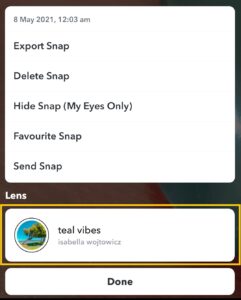
How To Find Out What Filter You Used On Snapchat Memories 2021 Updated Fixing Guides

Hazel Eyes Snapchat Lens Filter Eyes Filter Hazeleyes Lenses Snapchat Hazel Eyes Lens Filters Change Your Eye Color


Komentar
Posting Komentar