How To Get Rid Of Friends Bitmoji On Snapchat
Tap the gear icon or Settings in the top-right corner. Put them into any text message chat or status update.
How To Remove Bitmoji From Snapchat In 2021 Techuntold
Videos you watch may.

How to get rid of friends bitmoji on snapchat. Follow these steps below in order to revert back to the previous Snapchat notifications style. A bit like foursquare but for the teens. Bitmoji is your own personal emoji.
As a result many snapchat users are uncertain about whether their friends can see if theyve viewed their location or not. How To See Who Viewed Your Location On Snapchat 2021. This Snapchat Video tutorial will show you How To Remove Snapchat Bitmoji using new Snapchat updated app.
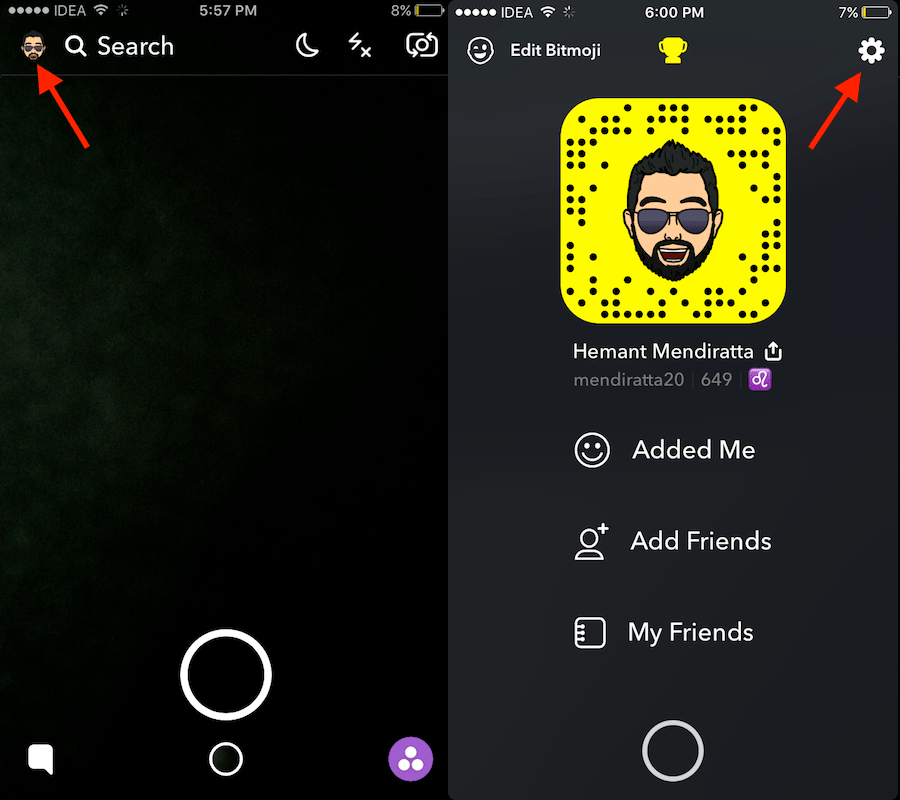
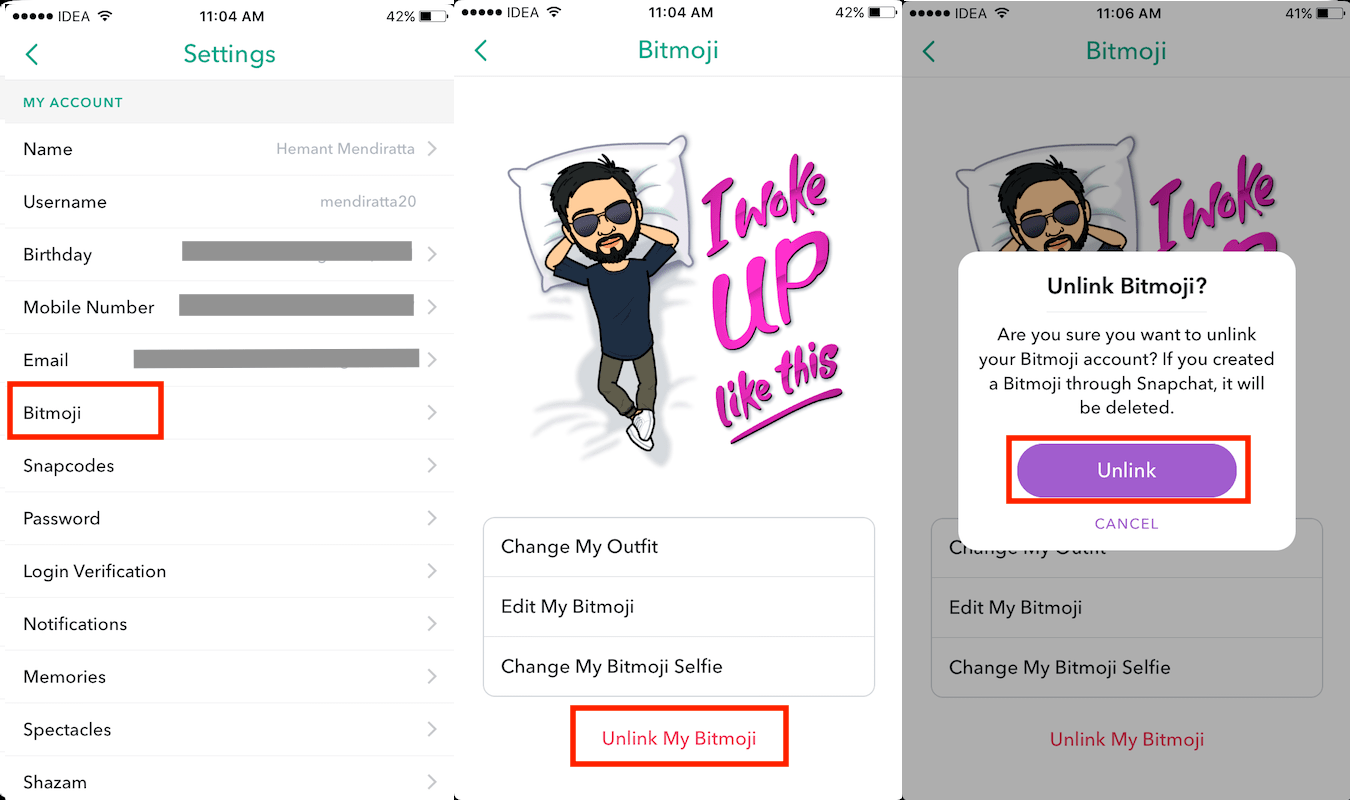
To delete outfits tap Select choose the outfits you want to delete or tap All to select everything then tap the trashcan icon at the bottom of the screen. To remove your Bitmoji character from Snapchat without deleting the character tap your Bitmoji in the top-left corner of Snapchat tap the gear icon then select Bitmoji. If playback doesnt begin shortly try restarting your device.
Confirm you want to Unlink your Bitmoji. Your friends list and your friends should reappear. Why did my friends Bitmoji disappear on Snapchat.
How to Get FaceMask Bitmoji on Snapchat profile Picture. Select the bitmoji sticker you want and send. First open the Snapchat app then choose the avatar style Bitmoji Deluxe in My Profile.
Snapchat will immediately add your bitmoji avatar to the snapcode if youve created one. Bitmoji Tennis is a fun and interactive game that will have you glued to your device. Tap on your AvatarBitmoji at the top-left corner of the screen.
This game is a sport-themed one. This process is possible on iPhones iPads and Androids. Tap on Manage keyboards then toggle Bitmoji Keyboard.
Next hit the Profile icon at the top. For those of you whore looking for a way to turn off the Bitmoji on Snapchat notifications the process is simple and takes less than a minute. Tap Phone and enter YOUR own phone number.
Now select My Friends. Last tap Unlink your Bitmoji. Both you and your friend must have the toggle turned on to use Friendmoji.
The latest snapchat update shows the bitmoji of whoever sends you a snap to turn of this feature simply go to the settings notifications and turn it off. In the Snapchat app tap on your Bitmoji in the top-left corner of the camera screen. If youre positive youve logged in with the right account try clearing Snapchats cache.
Before you can create a Friendmoji on Snapchat you must install the Bitmoji app create an account set up a Bitmoji avatar and link the avatar to Snapchat. Launch the Snapchat app. Once done close the app and re-open it.
Choose a friend from the pop-up list. To delete your Cameo selfie launch the Snapchat app and tap on your Bitmoji in the top left corner of the screen. Get Rid Of Your Bitmoji Profile Picture Two Ways To Remove Bitmoji From Snapchat.
Save your new design. After viewing a story for once if you wish to rewatch a snapchat story you can press the replay button found in the story section to view someones story again. Players have to move their characters to hit the tennis ball just like the regular tennis match.
On your snapcode screen tap the reverse arrow button on the right of the capture button. You can only use Friendmoji with Snapchat friends who also use BitmojiStep 2 Open. Once youre done link your avatar to your Snapchat account by tapping on the Profile icon in the top left corner of the Snapchat app.
Then once in the bitmoji keyboard simply select the smiley face icon in the righthand corner of the keyboard and swipe left for fun bitmoji stickers of your and your friend. Slide the bottom bar in the Avatar Designer to find EarringsChoose the earrings of your choice. To view your list of Best Friends launch the Snapchat app and tap your emoji in the top left corner.
Heres how you can add earrings to your Bitmoji avatar if youre already using BitstripsIn the Bitmoji app tap on the happy face icon at the bottom of the screen. Tap Remove and youre done. Step 1 Install and set up Bitmoji.
Create an expressive cartoon avatar choose from a growing library of moods and stickers - featuring YOU. Easy I show you how you can get the Facemas. As a first step you can do what Snapchat is calling ghost mode When you choose this feature your Bitmoji will disappear from the map and no longer be visible to any of your friends.
Bitmoji Tennis Hit the courts with friends in Bitmoji Tennis a new made-for-Snapchat game. You will then see the option to add your Bitmoji. If you dont see this option be sure to download the latest version of Snapchat via an update through the App Store.
The feature is coming to both phones at the same time and using it is the same for each. For iPhones when you open Snapchat tap your Bitmoji in the top left corner and then tap your Settings. Swipe to find your friends avatar.
Tap My Contacts and toggle on Connect Contacts so that you can see your friends in your stickers. How to view your Best Friends list on Snapchat. To use Friendmoji stickers in Snapchat both Snapchatters must have their Bitmoji successfully linked with Snapchat.
Toggle on Let others find me using this number. Snapchat will confirm if you want to remove your profile picture. You can do this from the Settings within the app.
Now go to Settings and scroll down right to the bottom. Your Best Friends list is only visible to you. Select Unlink your Bitmoji on the bottom of the screen.
Once youve found Bitmoji select Create My Avatar. Tap Remove to delete your Memoji. That will bring up a long list of things but you should look for and tap Notifications At the top of the screen should be what youre looking for.
Tap Bitmoji at the top left corner of the camera. How To Remove Bitmoji From Snapchat In Two Ways. Can you delete outfits on Bitmoji.
Launch the Snapchat app. How To Get Face Mask on Snapchat Bitmoji NEW UPDATE. Press and hold on any Friendmoji to reveal a list of your friends avatars.
It does not appear on your public profile. Your Friendmoji list will then refresh with your selected friend. Tap the three dots button in the left corner.
In the Profile screen scroll to find Bitmoji.

Unlinking Your Bitmoji How Does Snapchat Work
How To Remove Bitmoji From Snapchat In 2021 Techuntold


Komentar
Posting Komentar