How To Copy Snapchat Stickers To Whatsapp
You can get to a list of saved contacts on WhatsApp. You can add multiple stickers to quickly save them.
How To Use Snapchat Stickers In Whatsapp And Instagram In Hindi By Rk S Tech Bitmoji App Gboard Youtube
Select the Stickers option and look for the stickers you have added.
How to copy snapchat stickers to whatsapp. Tap on the Bitmoji you would like to send. Once done open WhatsApp and head to the Stickers section by tapping on the Emoji icon from the left of the text box. Scroll through the pop-up window and tap a messaging app.
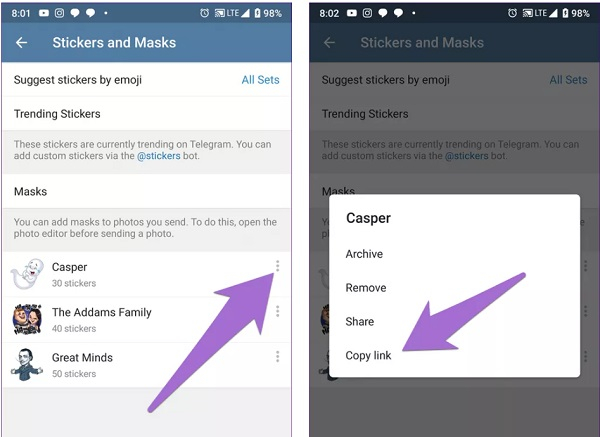
ChatStickerz - Find and. Tap the 4 circles in the bottom left hand of your screen to open your Stickers Applications. To start with just launch the Telegram app on your device and tap on its hamburger icon to.
Tap on Manage keyboards then toggle Bitmoji Keyboard. After adding tap the memoji sticker in the Notes app to open it in full-screen view. From now on get a full-screen experience of your app with keyboard and mouse.
Select WhatsApp from the list of messaging apps. Use the following guide to carry out the task. Launch Messages and tap a message.
This is how you can save the stickers sent by others on WhatsApp. To export stickers from Snapchat to WhatsApp you need to register a Bitmoji account. Again tap on Add option when asked.
Or you can send them directly from the app by following these steps. Tap on Languages and input Virtual or On-screen keyboard. Connect the source phone to the destination computer using a USB cable.
Add any other detail such as email if required. You can now share Diwali 2019 greetings and wishes on multiple social platforms like Twitter Snapchat Spotify and also through WhatsApp and Hike Messenger. Tap the plus sign to open the Stickers App Store.
Once there drag them around the screen to move them and dont forget you can pinch to resize them. How to create an iMessage sticker pack from WhatsApp stickers. After editing the image press the tick icon to see the preview of the sticker.
Even though every Messaging apps send the Memoji stickers as images WhatsApp can create stickers out of it and send it to any usersTo know more about using Memoji Stickers in WhatsApp go through our detailed guide. Hey did you get tired of a sticker on whatsApp and decide to remove them this video will show you just How to remove installed sticker from whatsAppJoin thi. WhatsApp Stickers have been one of the most popular features on the messaging app.
Now press Add to WhatsApp to add the stickers to WhatsApp. Open the App Store on your iPhone and install the Sticker Doodle app. Download the Telegram stickers on your phone.
Use Memoji Stickers in Snapchat on iOS 13. How to Export Telegram and WeChat Stickers to WhatsApp. Now your desired sticker will get saved in the favorite section of WhatsApp Stickers gallery.
Create a Bitmoji account. Note that these steps are a continuity of the previous steps. If you click on the Add to favorites option then the sticker will be added directly to your personalized keyboard section.
Tap Manage and enable Quidd. Each folder contains subfolders each having one sticker. Just like Telegram you can export WeChat.
Select the conversation that you want to paste the sticker into. The latest WhatsApp Android beta is adding a number of new features that should make sharing images with your friends a bit more fun and a lot. Thats it now you are done.
Select and copy the sticker that you want to use. You can do this from the native Bitmoji app or Snapchat. Launch WhatsApp and tap on the Contacts icon on the upper left side.
Up to 40 cash back Step 1. Launch the file manager app on your smartphone Navigate to the Whatsapp folder in the file manager Now enter the Media folder Scroll and find the WhatsApp sticker folder send the WhatsApp folder to your new device Place the WhatsApp sticker in the media folder inside. You get an option to add a custom shape to the sticker which adds another layer to exclusivity to your stickers.
When Apple rolled out the iOS 13 for the iPhone users WhatsApp did make use of the newly inbuilt Memoji Stickers. Select the App Store icon to the left of where you type a message. Essentially this tool works like a copy-paste function as users can shade an image captured in the Snap to replicate it and form a new sticker.
Up to 40 cash back The steps below will explain how to transfer your WhatsApp stickers along with the rest of the data. Tap Open in WhatsApp to launch the WhatsApp app. Drag a sticker to the garbage to delete it.
When you want to export Snapchat stickers you need to link your Bitmoji account to your WhatsApp account. If you want to make your sticker pack from your WhatsApp stickers you must complete all of the above steps plus the following. Features of Personal stickers for WhatsApp on PC.
You tap on them from the Stickers section to add them to your snap. Viola now your stickers appear on WhatsApp. Moreover the tool is relatively intelligent as it will recognize highlighted objects while automatically cutting out unwanted backgrounds.
To send Stickers on Whatsapp launch the app Click on the smile emoji on the left side corner of the keyboard Click on the Decal Icon present after emoji and GIF. Step 2 Launch the iTransor for WhatsApp application on the computer. The scissor icon that appears on the vertical editing menu on a Snap is the key to creating a custom sticker.
Step 1 Install the iTransor for WhatsApp software on the target computer. Thanks to WhatsApp since it is compatible with the Bitmoji stickers. While dragging a garbage can will appear in the right side.
If youre looking for different ways to celebrate Diwali heres a list. Select a recipient and send. Stop worrying about overcharges when using Personal stickers for WhatsApp on your cellphone free yourself from the tiny screen and enjoy using the app on a much larger display.
Tap on the Add New Contact icon and you can add the new contact name and number. The steps are outlined below. Select a custom sticker to insert it into the note.
Open the Bitmoji app. Tap on it to send. Download the WeChat sticker pack.
Go back and create a folder with any name under internal memory or. To save the sticker tap the Share button at the bottom left and select Save Image.
How To Export Telegram Wechat Snapchat Stickers To Whatsapp 2021

How To Export Telegram Wechat Snapchat Stickers To Whatsapp 2021


Komentar
Posting Komentar