Can You Turn Off People's Bitmoji On Snapchat
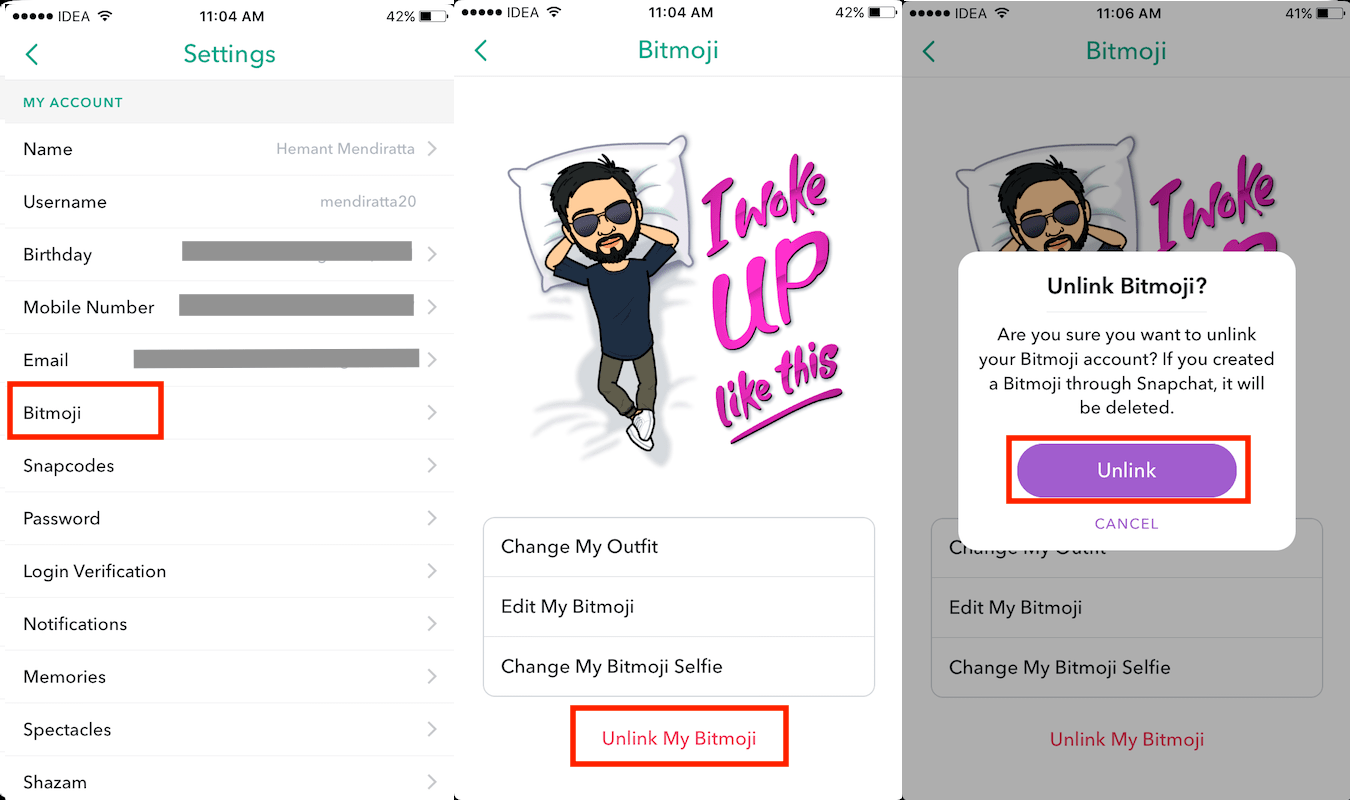
On the next screen tap on Unlink My Bitmoji at the bottom. Tap the gear icon or Settings in the top-right corner.
How To Remove Bitmoji From Snapchat In 2021 Techuntold
Most of the time the answer is a hard no.

Can you turn off people's bitmoji on snapchat. Toggle on Let others find me using this number. You might be familiar with Snapchat and bitmoji avatar if you have used already before. In the Bitmoji app tap on the Gear icon at the top-right corner.
In the Snapchat app tap on your Bitmoji in the top-left corner of the camera screen. Create an expressive cartoon avatar choose from a growing library of moods and stickers - featuring YOU. Scroll down and tap Select selfie.
As long as the user has their location on then their most recent location will be shown on the map and will only disappear after 8 hours of inactivity on Snapchat. Once youve found Bitmoji select Create My Avatar. If you created your Bitmoji account using Snapchat Login your Bitmoji avatar will be permanently deleted if you unlink your accounts you will.
Select Unlink on the dialog box to confirm. Whether youre looking to get a new ex off your mind or you just want to reduce the clutter on your Chat screen you might be wondering how to hide someone on Snapchat or clear out a conversation. First open the Snapchat app then choose the avatar style Bitmoji Deluxe in My Profile.
Quick Add shows you suggestions of people based on mutual friends and connections but if you want to help hide your profile from people who might be trying to find your Snapchat score you can turn this off in the settings menu in. If you dont feel like contributing to Snapchats well-being you can very easily turn it off. Doing so will begin linking your Bitmoji creation to Snapchat.
Select Unlink your Bitmoji on the bottom of the screen. That will bring up a long list of things but you should look for and tap Notifications At the top of the screen should be what youre looking for. If you created your Bitmoji using the Snapchat login then it will not only be removed.
Now launch the app and click on your Bitmoji avatar in the top left corner of the screen. Both you and your friend must have the toggle turned. Snapchat profiles now have a brand new look and a new dimension with 3D Bitmoji in profiles.
Snapchat lets you easily talk with friends view Live Stories from around the world and explore news in Discover. Here is where. If you dont see this option be sure to download the latest version of Snapchat via an update through the App Store.
Now tap on the thumbnail at the top-left corner of your screen. The answer to this is a bit more complicated than you might think. As a first step you can do what Snapchat is calling ghost mode When you choose this feature your Bitmoji will disappear from the map and no longer be visible to any of your friends.
The map doesnt turn on and doesnt track users unless a user gives it permission and selects what audiences can see that user on the map. Tap the t-shirt icon in the upper right corner to change your avatars outfit. Snapchat gives us to make our interested bitmoji avatar for free.
You should also take a look at the See Me in Quick Add setting here which is able to be turned on and off. Next hit the Profile icon at the top. Under My Account select Bitmoji.
Once youre in camera mode in Snapchat use two fingers to squeeze the camera screen toward the center. Bitmoji is your own personal emoji. This will unlink your bitmoji on Snapchat.
If your Bimoji and Snapchat are idle for over 60 min or more your Bitmoji falls asleep on the Snapchat app. Tap Agree Connect. As long as the user has their location on then their most recent location will be shown on the map and will only disappear after 8 hours of inactivity on Snapchat.
So whether you love or hate Snapchats newest feature. Snapchatters are able to see a three dimensional version of themselves on their Snapchat profile and. Put them into any text message chat or status update.
If your Bimoji and Snapchat are idle for over 60 min or more your Bitmoji falls asleep on the Snapchat app. You will still be able to see your own avatar but it will be holding a blue Snapchat logo in front of its face to indicate that other users cant see it. Tap Phone and enter YOUR own phone number.
Bitmoji in Notification Then all you have to do is toggle that option off to keep Bitmojis out of your notifications bar. How To Turn Off Your Location Using Ghost Mode. In the Profile screen scroll to find Bitmoji.
When your profile page loads tap on the gear icon in the top-right to. Keep in mind that you can turn Ghost. To do so first update your Snapchat app to the latest version v108250.
So toady in this blog I am going to share some basic knowledge to change bitmoji avatar on Snapchat app or say to change snapchat avartar. Its the yellow icon with a white ghost typically found on your home screen iPhoneiPad or in the app drawer AndroidStep 2 Tap the Ghost. To do so first launch the Snapchat app on your mobile.
To turn off location data altogether youll need to visit your phones settings where you can scroll down to Snapchat click on location and choose to never share. Confirm you want to Unlink your Bitmoji. Step 1 Open Snapchat.
Its at the top-left corner of your profile. If youve already. Lifes more fun when you live in the moment.
You cant turn the feature itself off but you can turn your personal location off by enabling Ghost Mode. As described above Ghost Mode gives you the option to hide your location for 3 hours 24 hours or until you turn off Ghost Mode manually effectively hiding your location for good. Tap the icon with an avatar and a pencil in the upper right corner to change your avatars features.
Here you can scroll through a number of selfie customizations provided by Snapchat. Since opening the Snap Map from the camera display shows everyones location on your. Its at the top-left corner of the screen1 X Research sourceStep 3 Tap Create Bitmoji.
Tap My Contacts and toggle on Connect Contacts so that you can see your friends in your stickers.

Snapchat Is Replacing Snapcode Pictures With Bitmoji And People Aren T Happy The Verge

Turn Off Bitmoji In Snapchat Notifications Youtube


Komentar
Posting Komentar