How Do You Send Friend Bitmojis On Snapchat
With the update iPhone and iPad users will be able to send personalized Friendmojis or Bitmoji stickers that include both you and your friend directly in Apples Messages app. To send a Friendmoji a new Friend icon will appear in the upper-right corner of the Bitmoji keyboard extension which can be added to trusted keyboards in the iOS Settings app.

F R I E N D S Bitmoji Style Rachel Green In 2021 Rachel Green Style Rachel
Tap the gear icon at the top-left of the screen.

How do you send friend bitmojis on snapchat. Tap the chat bubble icon. Using the new Friendmojis feature you can send stickers that combine your own Bitmoji with your friends creations. To send a Bitmoji to your friend open an iMessage conversation tap the apps button to the left of the text box and launch the app store.
Go to the face icon to find your Bitmojis. Now go to the Bitmoji Stories profile and select the story you would like to see. To use Friendmoji stickers in Snapchat both Snapchatters must have their Bitmoji successfully linked with Snapchat.
Alternatively tap on the icon in the top-right corner of the display search for the user then tap on their name. If you would like to customize your Snapchat using bitmojis is an excellent way to do so. Article continues below advertisement But recently Snapchat added a feature that includes Bitmojis in its notifications bar.
To add them as a sticker take a picture or video then hit the turning page icon next to the T. Sending Friendmoji in Snapchat Download Article. Create an expressive cartoon avatar choose from a growing library of moods and stickers - featuring YOU.
The main idea is to make that person the last person that you have interacted with. Choose the My Account option near the bottom of the screen. Snapchat which went public in March became a top 10 most-downloaded app in eight of the 10 biggest app markets this year according to data from app analytics company App Annie.
Youll need to start a chat with your Bitmoji friend first. A Bitmoji can be sent in chat or added to snaps and you can also send friend Bitmojis featuring more than one caricature per frame or sticker just like in this example. Tap the friend icon at the top.
Open the Snapchat app. Install and set up Bitmoji. Anyone who has their Bitmoji and Snapchat accounts linked together will be able to send Friendmojis in Messages.
The social media app offers plenty of Bitmoji stickers to play with. If you already have the Bitmoji keyboard enabled on your phone follow these steps to send Friendmojis. Allow access to your Snapchat friends.
There are two ways to get rid of Bitmoji on Snapchat. Tap My Contacts and toggle on Connect Contacts so that you can see your friends in your stickers. Under the manage tab switch Bitmoji to On Now.
When you tap the Stickers button swipe left because thatll reveal the available Bitmoji stickers. Choose a friend from the pop-up list. Tap Phone and enter YOUR own phone number.
To start a chat swipe right on the Snapchat camera then tap on the users friend box. Cant accept friend requests. How do you get 2 Bitmojis on Snapchat.
Your Bitmoji represents you and your character on Snapchat. One from Snapchat and the other is from. You can add a bitmoji to your profile and use bitmoji stickers in your snaps and even create animated 3D bitmojis.
After you take a picture or video access your Bitmoji by tapping on the square in the upper right hand corner. To do so go to the persons profile and send them a message. How to Use Bitmoji with Friends Method 1 Method 1 of 3.
Review the users information. In the Bitmoji app tap on the Gear icon at the top-right corner. Press and hold on any Friendmoji to reveal a list of your friends avatars.
If you are looking to unlink or remove Bitmoji from Snapchat weve got you covered. This lets you add the big emojis. Put them into any text message chat or status update.
Method 2 Method 2 of 3. Browse the Bitmoji menu to find the Bitmoji you want to send and tap to copy it to your clipboard. Create a new snap you can add Bitmoji to photos and videos.
Adding Friendmoji Stickers to Snaps in Snapchat Download Article. Method 3 Method 3 of 3. To send a snap of you and your friends bitmoji together in a snap sticker you have to first go to your bitmoji keyboard in Snapchat your friend will also need to have already created a bitmoji of.
Signed in and out multiple times. Your Friendmoji list will then refresh with your selected friend. If youre in the opposite situation and want to add Bitmoji or wish to use Bitmoji in your snaps then head over to this post about adding and using bitmojis.
This could be anything. There are cute custom Bitmoji to use in chats with friends or in the apps different stories that insert you and a friend into quirky animated conversations. When it comes to bitmoji most Snapchat users know how to access their own bitmoji stickers and send one in a Snap message but you can also send a bitmoji of you and your friend in a snap sticker together.
You should see the new person now starring with you in the story. If you are friends on Snapchat you will typically see the persons Snapchat score or total number of sent and received snaps. Tap the friend icon at the top.
Install and set up Bitmoji. Select a friend to see Friendmojis with them. Tap and hold on a username.
If you dont see this number they. Touch the Reset My Avatar button. Bitmoji is your own personal emoji.
If you want to add more Bitmoji go back to Stickers and repeat the procedure. If you already have the Bitmoji keyboard enabled on your phone follow these steps to send Friendmojis. Swipe to find your friends avatar.
Bitmoji is fully integrated into Snapchat so now all you have to do is create an account and assemble your avatar and itll be available in stickers you can slap on your Snaps as well as filters. Open the Bitmoji app. You will see a green bar above your keyboard confirming Bitmoji copied You can switch menu categories by swiping left and right or.
You can send the Bitmojis in chats or add them on as stickers onto your snaps. Tap the Bitmoji you want to send. In order to send a Bitmoji in a Snap simply select the friend you want to send it to press the Bitmoji button on the far right side under the text box and select the Bitmoji sticker you want them to receive.
Streaks dont show unless you send the person you have a streak with a snap. Friend emojis dont show. All my friends bitmoji selfies are not showing.
Tap on the globe icon to open the Bitmoji Keyboard. Tap the Bitmoji youd like to use and place it somewhere on your snap. Set up Friendmoji on the Bitmoji App.
Tap the Yes button to confirm that you understand you will be deleting the old avatar to create a new one. Tap on the globe icon to open the Bitmoji Keyboard. Originally available in the Snapchat app users will now have access to.
Toggle on Let others find me using this number. But Snapchats biggest growth comes from Bitmoji the personal emoji app Snapchat parent Snap acquired last.
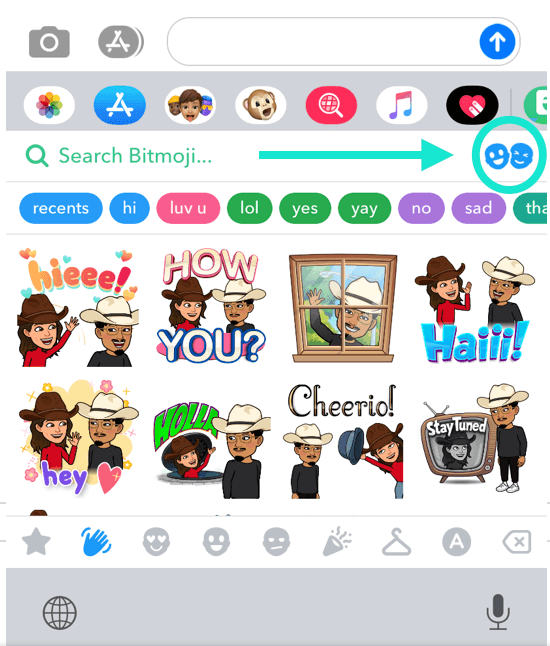
Set Up Friendmoji On Ios Bitmoji Keyboard Bitmoji Support

Snapchat Launches Bitmoji Widget Chat Shortcuts For Your Home Screen Techcrunch


Komentar
Posting Komentar